
Weight Tally
Stay on top of your daily average parcel weight, live.
Weight Tally shows a live average parcel weight per order from your StoreFeeder orders, for the shipping services you choose.
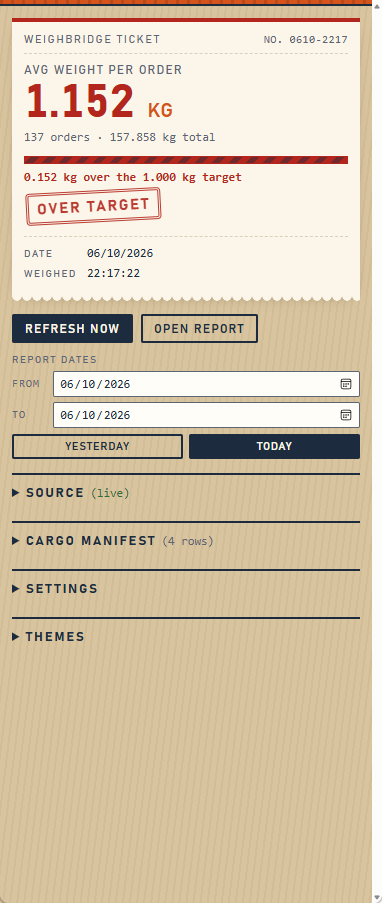
The panel sits alongside whatever you’re working in, and refreshes as the day goes on.
Why it matters
Several carrier accounts — Royal Mail Tracked among them — are priced against an agreed average weight rather than parcel by parcel. Your rates are built on the assumption that you will stay around that figure.
Keep veering over it and the problem is not one awkward invoice. It is that the account gets re-rated, and the new prices apply to everything that follows.
Weight Tally keeps that number in front of you while the day is still running. Set your target, keep the panel open beside your pick and pack screen, and a heavy run becomes something you notice at the time rather than something you find out about at a rates review.
What it does
- A weighted average weight per order across only the shipping services you pick — so a next-day parcel service isn’t averaged in with your pallets.
- Order count and total weight alongside it, so you can see what the average is made of.
- An optional target, with a clear over or under reading rather than a number you have to interpret.
- Today, yesterday, or any date range, so you can check where the month is going as well as the day.
- Auto-refresh through your working hours, so it keeps up without you touching it.
- A despatched-only filter, four themes, and a layout built to work in a narrow side panel.
Works with StoreFeeder
Weight Tally reads both the classic StoreFeeder interface, using the Despatched By Courier report, and the newer StoreFeeder at app.storefeeder.com. It works out which one you’re on by itself — there’s nothing to configure.
Private by design
Weight Tally runs entirely inside your own browser, signed in as you. It reads the order information already on the StoreFeeder pages you have open — courier, shipping method, status and weight — and works out the average locally.
Nothing is sent to Portside Commerce or to anyone else. There are no accounts, no servers of ours involved, no analytics and no tracking. Your settings are stored in your own browser and go nowhere.
The full detail is in the privacy policy.
Browsers
Chrome, Edge and Firefox. All three are in preparation — the badges above become links as each listing goes live.
Questions
Firefox asks me to allow access. Why?
Because Weight Tally has to read the StoreFeeder page to count anything. Firefox asks you to grant that per site, which is the browser doing its job. Granting it for StoreFeeder gives Weight Tally no access to anything else.
Can the panel sit on the left?
That’s a browser setting rather than something Weight Tally controls. Each browser handles side panel placement its own way.
What happens if StoreFeeder changes their screens?
Weight Tally reads the page, so a significant redesign could break it. If that happens, tell us and we’ll fix it — it already supports both the classic and the newer interface for exactly this reason.
Does it change anything in StoreFeeder?
No. It only reads. It never writes, edits or submits anything.
Support
Email hello@portside-commerce.com and a person will read it.
Weight Tally is built by Portside Commerce Ltd and is not affiliated with, endorsed by, or connected to StoreFeeder. StoreFeeder is named here only to describe what Weight Tally works with.